Remove AI Detection from Image
Remove supported C2PA, EXIF, XMP and IPTC data from JPG, PNG and WebP. Check the clean export before you share it.
Free · No sign-up · No file uploads
JPG, PNG, WebP, HEIC, TIFF · 20 MB each
Image preview is unavailable here. You can inspect the metadata and download a copy in the original format.
Image metadata guides
- AI metadata
Find the metadata that a camera, editor or generator wrote into your file.
- Instagram AI info
Find the next step for an existing post, a Story or a new feed upload.
- SynthID watermarks
Tell an invisible watermark apart from a platform label or file record.
How to clean an image
- Choose an image
Open up to five supported files, 20 MB each.
- Review the file
Check the dimensions and see which metadata types were found.
- Download a clean copy
Keep the source format without recompression, or convert a single image.
Will removing metadata remove the AI label on Instagram?
Instagram and Facebook can display AI info, the label Meta previously called Made with AI. Meta describes industry signals such as C2PA and IPTC information, alongside creator disclosures. An ordinary software name in EXIF or XMP may help you identify the editor that saved your file. It cannot tell you on its own whether Meta will label the image. Meta’s labeling explanation
For a new upload, use the metadata comparison to see what the clean download contains before sharing it. The tool can remove supported metadata from that file. The platform still decides how to label the upload and can use its own signals. Follow its disclosure requirements whenever they apply.
For a post that’s already live, cleaning a local copy has no effect on the published post. Re-uploading a cleaned file does not guarantee a different label. TikTok says its automatic label cannot be removed from an existing post and may be applied when an upload includes C2PA Content Credentials. TikTok’s AI-generated content help
For watermarks in the picture, metadata cleanup leaves marks embedded in the pixels, including invisible watermarks such as Google’s SynthID. If you came here to remove AI detection from a photo, the comparison tells you which supported file records were removed. It is not an AI detector score. Google DeepMind’s SynthID overview
What changes in the clean copy?
Image files may include camera details, GPS coordinates, editing software names, generation prompts, or Content Credentials. The cleaner shows recognized metadata blocks and their readable values, then saves a separate copy. Keeping the source format skips recompression. Keep your original before sharing an exported copy.
How metadata and AI detection differ
Embedded metadata is information saved alongside the image. A detector can also evaluate the picture itself, use an invisible pixel watermark, or consult provenance information held outside the file. This tool performs metadata cleanup. Check the disclosure rules of the service where you share the image.
A before-and-after example
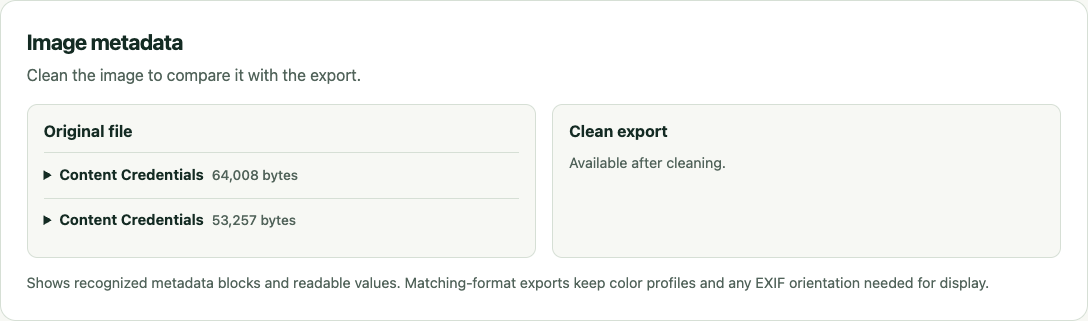
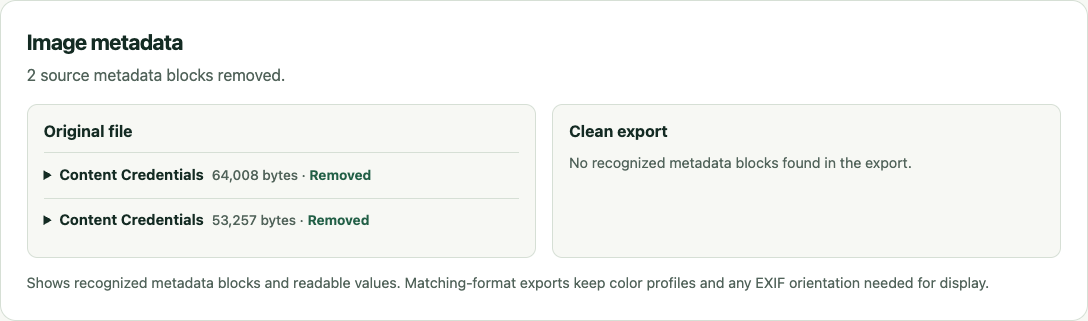
We tested a 1,024 × 683 signed JPEG from the Content Authenticity Initiative’s public C2PA fixtures. The source file had two JUMBF segments identified as Content Credentials. In the Clean export, neither segment was present. The JPEG went from 166,864 to 49,591 bytes, and a pixel-by-pixel comparison of the decoded source and export matched. The public signed test file

Before cleaning
After cleaning
In a separate JPEG fixture, the source report showed an EXIF camera field and the XMP field CreatorTool. Both source blocks were absent from the same-format export. If your own file carries EXIF Software or an IPTC Digital Source Type, open the corresponding row and compare it with the new download. The panel shows readable fields that are present and lists binary credentials by type.
A file from ChatGPT or a Photoshop export with Content Credentials enabled may contain provenance data. Inspect your original to find out what that specific export includes. Removing the embedded record leaves any pixel watermark, such as SynthID, in place. OpenAI’s provenance documentation · Adobe’s Photoshop export documentation
What the metadata panel tells you
The panel checks for common metadata containers. In JPEG files it looks for EXIF, XMP, Photoshop or IPTC records, comments, and recognizable JUMBF blocks. In PNG files it checks for EXIF, text chunks, and embedded Content Credentials. In WebP files it checks for EXIF and XMP chunks. A container name shows where metadata is stored. It does not determine whether an image was made with AI or verify who created it.
Expand a block in Original file to view its readable fields. After cleaning, Clean export shows what the tool found by scanning the newly generated file. A Removed label means the original block was absent from the scanned export. An export may contain a minimal EXIF orientation field to keep the same display direction. ICC color profiles and compressed image data stay intact when you keep the original format. Binary blocks such as embedded credentials can be recognized even when their fields are unavailable for preview. The comparison excludes color profiles and image encoding details. Keep any original signed file or publishing record you need for attribution.
Before you share the exported image
Open the clean copy and check crop, orientation, transparency, color, and readability at the size you intend to publish. Large files may take longer to check on a phone. The tool accepts up to five supported images per batch and produces a ZIP with the copies that can be cleaned. It can inspect standard still HEIC and classic TIFF in addition to static JPG, PNG and WebP. Some container layouts are rejected to protect the image data. Each image can be up to 20 MB and 24 megapixels, with at most 8,192 pixels on either side.
An embedded record is only one place information about an image may exist. A publishing service can have a previous copy, a separate disclosure setting, or its own detection system. Use the clean copy for file-level privacy and keep any required origin disclosures when you publish.
Frequently asked questions
Can removing metadata change an AI detection result?
A label based on embedded file metadata may change after export. A platform can still use pixels, account information, separate provenance records, or its own signals to label an image.
Which image data does the cleaner remove?
The tool removes supported source metadata such as EXIF device and GPS fields, XMP, IPTC, comments, PNG text and embedded C2PA Content Credentials. A matching-format copy can contain a minimal orientation field to keep the photo facing the same way.
Will the image quality or dimensions change?
Keep the original format to avoid recompression and preserve display dimensions, pixels, color profiles and transparency. Converting an image to another format re-encodes it. JPG conversion uses white behind transparent areas.
Does the tool upload my image?
The file is read and processed on your device. The original stays where it was and the clean copy downloads separately.
Can I remove a visible watermark?
The tool exports the image as it appears. Visible graphics remain, and pixel-level watermarks or classifier signals may remain detectable.
Will this remove the AI info label on Instagram or Facebook?
The tool cleans a local file. It does not edit an existing post, change a creator disclosure, or control how Instagram or Facebook labels a new upload. Use the metadata comparison to verify the file and follow the platform’s disclosure rules.
What is C2PA and why do platforms read it?
C2PA is a provenance standard used by Content Credentials to record information such as who created or edited an asset and how. In supported files, these credentials may be stored in a JUMBF container. Meta and TikTok describe using provenance signals when applying AI labels. A credential can also describe edits unrelated to AI.
Which output format should I use?
Choose Same as original to clean supported metadata without recompressing. JPG, PNG and WebP can also be converted to another of those formats. HEIC and TIFF exports keep the source format.
Can I clean images from ChatGPT, Firefly, Gemini or Midjourney?
Yes, if the export uses a supported image format. We inspect what the file actually contains. The records can vary with the product, version and export settings.
How many images can I clean at once?
Clean one image and download it directly, or choose up to five and download the successful clean copies in a ZIP. Each file can be up to 20 MB and 24 megapixels, with at most 8,192 pixels on either side.
Do HEIC, TIFF, GIF or animated WebP work?
Standard still HEIC and classic TIFF files can be cleaned in their original formats. The tool shows a metadata report for these formats without a thumbnail or conversion. HEIC sequences, BigTIFF, GIF and animated WebP are outside the supported formats.
Is the image cleaner free? Do I need an account?
The metadata inspection, cleanup and downloads are free, with no account required. Selected images and files are processed in your browser.
Should I keep the original with Content Credentials?
Keep the signed original if you need its attribution, signature or edit history. The cleaned download is a separate copy, and its comparison report shows which recognized blocks were removed.